


Technical session led by Magno Logan, Partner and CTO at GoHacking, for Offensive Engineering.
I have worked in security for over fifteen years, across penetration testing, code reviews, application security, threat research and DevSecOps. I started researching GitHub Actions back in late 2021, when the service was only two years old, and I have kept coming back to it since because more and more companies depend on it every year and most of them have not thought hard about what that dependency exposes.
The title I gave this session is one action, your whole pipeline. If one of the actions you use gets compromised, whether you call it directly or it sits somewhere deeper in the chain, that single action can compromise your whole pipeline. It can compromise your runners, the virtual machines that execute your automation, and everything those runners can reach.
This walkthrough covers how that happens. I start with how Actions work and what an attacker can do once they are inside a runner, then walk the tj-actions compromise from March 2025, which is the clearest real-world version of this attack, and finish with the fixes that actually close it.
Here are the slides along with the session recording.

A third party action is a step in your job, and steps share an environment
Here is the whole threat model in one sentence. A third party action is a step in your job, and steps in a job share an environment.
When you reference an action in your workflow, every line of that action’s code runs inside your runner, with access to whatever that job holds. It is no different from pulling in a library or a dependency in your application code. You are running code you did not write and did not review, on your own infrastructure, often with credentials attached.
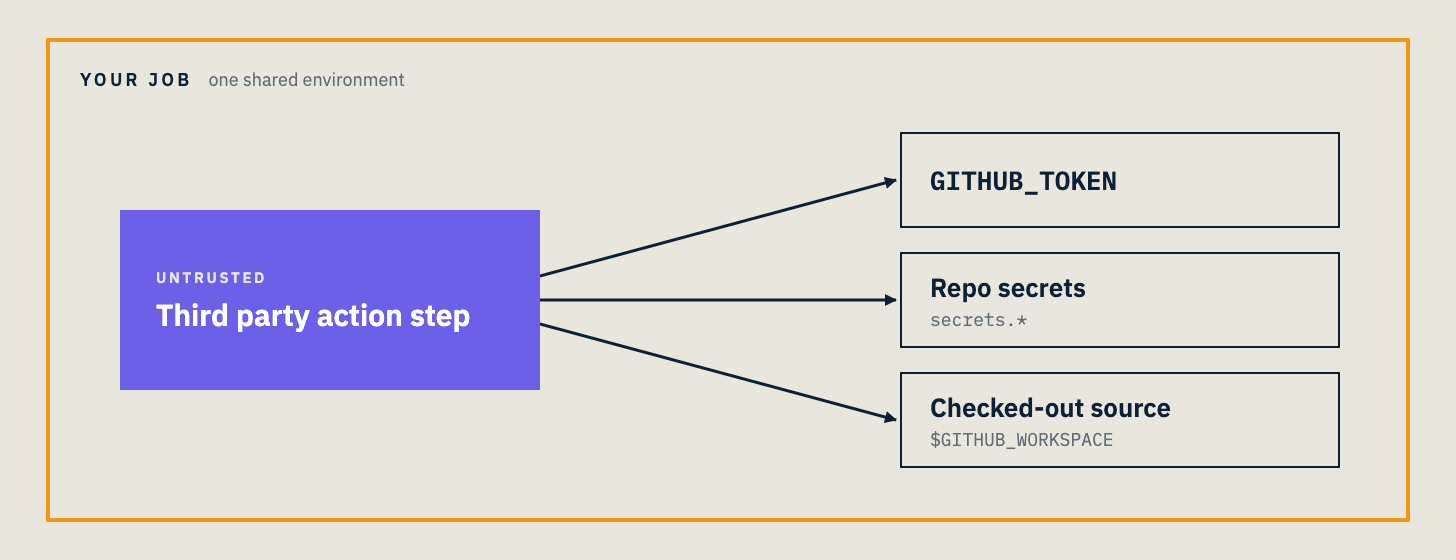
Three things sit in that shared environment, and all three are worth an attacker’s time.
The first is the GITHUB_TOKEN. GitHub generates this automatically for every run and hands it to the runner. It is only valid while the runner is active, but while it is active it can read your repository, and by default on older repositories it can write to it as well. Anyone who reaches that token while the run is live can change code, change anything, on your repo.
The second is your repository secrets. The GITHUB_TOKEN is one secret, but you can add more, and people do. Deploy keys, registry tokens, cloud credentials, API keys for other services. These go into the runner the same way, and unlike the GITHUB_TOKEN they are usually long lived. A leaked AWS key or SSH key does not expire when the run ends, which makes them more dangerous than the token.
The third is your checked out source. With the token, an action can pull the full repository, including its history. If anyone ever committed a secret and did not clean the Git history afterward, it is still reachable there.
Proving an attacker can reach the runner
When I started this research, the first thing I wanted to validate was simple. If a malicious action runs in my workflow, can it open a connection back out to me?
So I wrote a workflow that installs netcat on the runner and opens a reverse shell to a command and control machine I set up on AWS, completely separate from the Azure environment the GitHub runner lives in. I used port 443, because that is one of the few ports the runner is allowed to use to reach outside the Azure environment. A connection on a higher port gets blocked. Port 443 is HTTPS, everyone uses it, and it goes straight out.
It worked. The runner connected back to my listener, and the run hung there waiting, which gave me an interactive shell into the runner for as long as the job stayed alive. That timeout is around six hours per job. For six hours I could run commands inside that runner, look at what was there, and try to move laterally.
I ran the first version of this by calling the malicious code directly in my own repository. Then I did the version that actually matters. I moved the backdoor into a separate repository, dressed up as an ordinary third party action, and called it from my workflow the way you would call anything from the GitHub Marketplace. Same result, except now the malicious code lived somewhere else entirely, and my workflow looked clean.
That is the point. GitHub has a marketplace where anyone can publish an action, and there is no security verification. GitHub does not check whether a marketplace action is safe, trusted, or malicious. Anyone can publish anything, and the moment you reference it, its code runs in your runner.
The GITHUB_TOKEN is masked in the logs, not in the runner
One detail from that first run is worth pulling out, because people misread it.
When the runner dumps its environment variables, the GITHUB_TOKEN shows up masked, as a row of asterisks in the log output. That masking is only in the log file. It is not masked inside the runner. The runner can read the real value, which means any code running in the runner can read it too.
And the masking in the logs is thin. GitHub applies a regular expression to catch the token before it reaches the public log. Base64 encode the value first and it sails straight past, because the encoded string does not match what the filter is looking for. So a malicious action that wants to leak a secret through the logs just encodes it on the way out.
tj-actions, the version that happened to everyone
In March 2025 this stopped being a lab exercise. The tj-actions/changed-files incident, CVE-2025-30066, hit over 23,000 repositories that were using that action.

What makes it the perfect teaching case is what the victims had to do to get compromised, which is nothing. Nobody’s workflow file changed. Nobody updated anything. One commit changed where every version tag pointed, and every tag moved onto a malicious commit. If you referenced the action by tag, your next run pulled the malicious version, and you never touched your own code.
The lesson everyone took from this, and the one I already knew but saw proven at scale, is that a GitHub tag is not immutable. You can point a tag at a different commit whenever you want. You do not have to change the version number, you do not have to cut a new release, you just move the tag. So referencing an action by a tag like v4, or by a branch like main, means you are trusting that the thing behind that pointer has not moved. In this case it moved.
The attack did not start at tj-actions. It came in through the chain above it.

One maintainer had used a personal access token instead of the GITHUB_TOKEN in one of their actions. That token leaked. The same token had permissions across multiple repositories, including reviewdog, and the reviewdog action setup had an auto invite mechanism that let the attacker add themselves as a contributor. From there the compromise flowed down through the dependency tree into tj-actions and out to everyone using it, through CVE-2025-30154.
Nothing in that chain was exotic. There was no zero day. A mutable tag, a leaked over-scoped token, an auto invite, and secrets printed to logs. The secrets did not even need to be sent anywhere. The repositories were public, so publishing the secrets to the workflow logs was enough, and everyone affected had to rotate every credential those runs had touched.
Five steps, none of them exotic
The whole attack reduces to five steps, and it is worth seeing them in order because none of them require anything clever.
A workflow references an action by a mutable tag, a v4 or a main. The upstream action is compromised, through a stolen token or a moved tag. The next run pulls the malicious commit, with no diff on your side. The action reads the job environment, the token, the secrets, the source. And the secrets land in the logs or at an endpoint the attacker controls, where public logs are enough.
Demo: the same attack in a lab
To show the mechanism directly, I built a lab with a vulnerable workflow and a hardened one, side by side, around the same pattern as the tj-actions CVE.
The vulnerable workflow is how most pipelines looked in the wild before March 2025. A third party action referenced by a mutable tag. The GITHUB_TOKEN left at the repository default, which on older repositories is read and write. And the deployment secrets living in the same job as the untrusted third party code.
The first thing to notice about the vulnerable version is what is missing. There is no permissions block. Without one, the token inherits the repository default, and for any repository created before February 2023 that was never changed, that default is read and write.
When I run that workflow, the action reads the secrets out of the job environment and sends them to a webhook I control. The fake AWS key and npm token land at my endpoint in plain text. That is the entire attack. The action was handed secrets it had no reason to need, and it took them.
The hardened version changes a few lines and the whole picture changes with it. I walk those fixes now, because they are the part worth keeping.
Fix one, pin to full commit SHAs
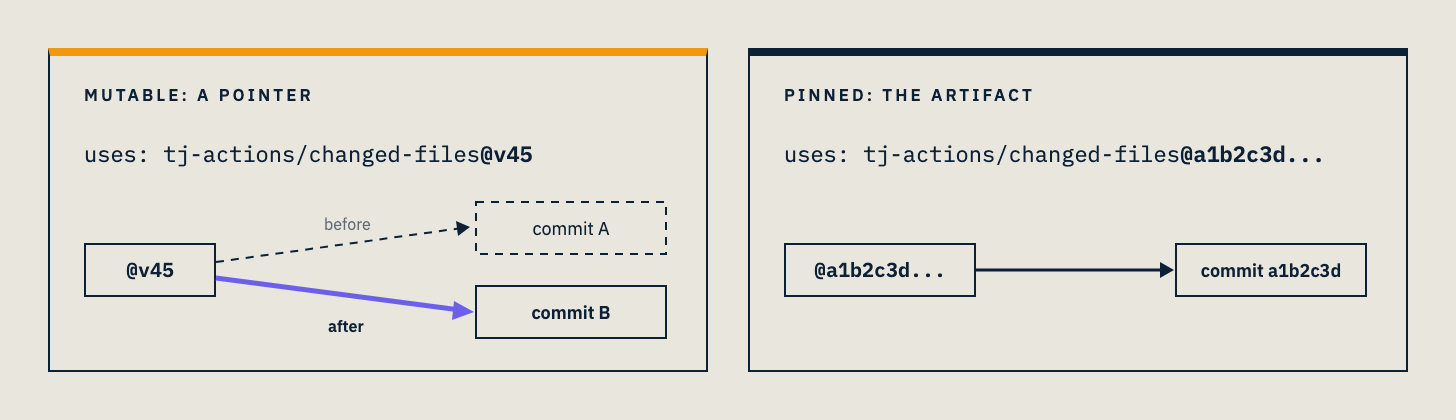
A tag is a pointer. A SHA is the artifact the commit actually produced.
When you reference an action by its full commit SHA instead of a tag, a moved tag cannot touch you. In the tj-actions compromise, the people who had pinned to a hash were not affected, because the hash does not move. The tag moved onto the malicious commit, the hash stayed on the code it always pointed at.
# mutable: a pointer
uses: tj-actions/changed-files@v45

# pinned: the artifact
uses: tj-actions/changed-files@a1b2c3d...
The cost is that pinning is less convenient. When you want a newer version, you have to update the hash yourself, and you can automate that part. But the protection is real and it is the single most effective change you can make.
There is a floor to this, and I want to be honest about it rather than oversell the fix. You can only pin the action you call directly. If that third party action depends on other actions, and references them by mutable tag instead of by hash, you cannot control that. Your pinning stops at the first hop. You are still trusting the maintainer of the action you pinned to have pinned their own dependencies, and often they have not.
GitHub is working on a workflow lock file to close this, something like what npm and Go already have, that would pin direct and transitive action dependencies by commit SHA. A go.sum for workflows. It was on the roadmap at the time of this session and had not shipped yet.
Fix two, scope the GITHUB_TOKEN
Add a permissions block and give the token only what the workflow actually needs.
permissions:
  contents: read
The moment you specify any scope, every scope you did not list is set to none. So a block with contents set to read means the token can read your code and do nothing else. If someone grabs it mid run, it reads your repository and that is the end of it.
A few things worth knowing about the default. Before February 2023 the default was read and write. GitHub changed it, but only for new organizations and repositories, so anything older that was never touched is still sitting on read and write. One useful piece of built in protection is that pull requests from forks get a read only token regardless of your settings, which limits what an untrusted contributor’s PR can do.
Fix three, give untrusted code nothing to take
This is the one that would have mattered most in the tj-actions case, and it is the separation of duties idea applied to a pipeline.
Split the job. Run the untrusted third party action in a job that holds no secrets at all. Each job runs on its own separate virtual machine, so a job with no secrets and no credentials has nothing for a compromised action to harvest. In my hardened workflow, the job that runs the third party code holds nothing, and the job that holds the deployment privileges runs only first party code and depends on the first job finishing before it starts.
Use OIDC for cloud credentials. Instead of storing long lived AWS keys as secrets, use OpenID Connect to get short lived, identity bound credentials at runtime. There is nothing durable sitting in the runner for an attacker to steal, because the credential exists only for the moment it is needed and is tied to the specific workflow.
Watch egress. Tools like Harden-Runner from StepSecurity monitor the outbound connections a runner makes and flag ones going somewhere they should not. Egress monitoring is actually how the tj-actions compromise was caught, through an unexpected network endpoint in the traffic.
One caution on that last point, so you calibrate it correctly. In the tj-actions case the secrets were printed to the logs rather than sent to an external server, so the action never phoned home in the usual sense. Egress monitoring alone would not have caught the log exfiltration. It is one layer, not the whole answer, which is the point of running all of these together rather than picking one.
Four lines, most of the risk
If you take nothing else from this, these are the lines to put in your workflows this week.
permissions:
  contents: read

- uses: org/action@<40-char-sha>
  # no secrets in this job
Pin the action to a full commit SHA so a moved tag cannot reach you. Scope the token so a stolen one can barely do anything. And keep the secrets out of any job that runs code you did not write, so a compromised action finds nothing worth taking.
None of this is exotic, and that is exactly why it works. The attacks that hit real pipelines are not clever. They walk in through a mutable tag, an over scoped token, and secrets sitting next to untrusted code. Close those three and you have closed most of the door.
Go check your workflows. Tonight, or before your morning coffee.
Magno Logan is Partner and CTO at GoHacking and has worked in security for over fifteen years. He has presented his GitHub Actions research at DEF CON, NDC Security, NDC Oslo, OWASP AppSec Dublin, NorthSec, and BSides events across Canada and the US. Offensive Engineering publishes technical walkthroughs from practitioners in hands-on security roles.